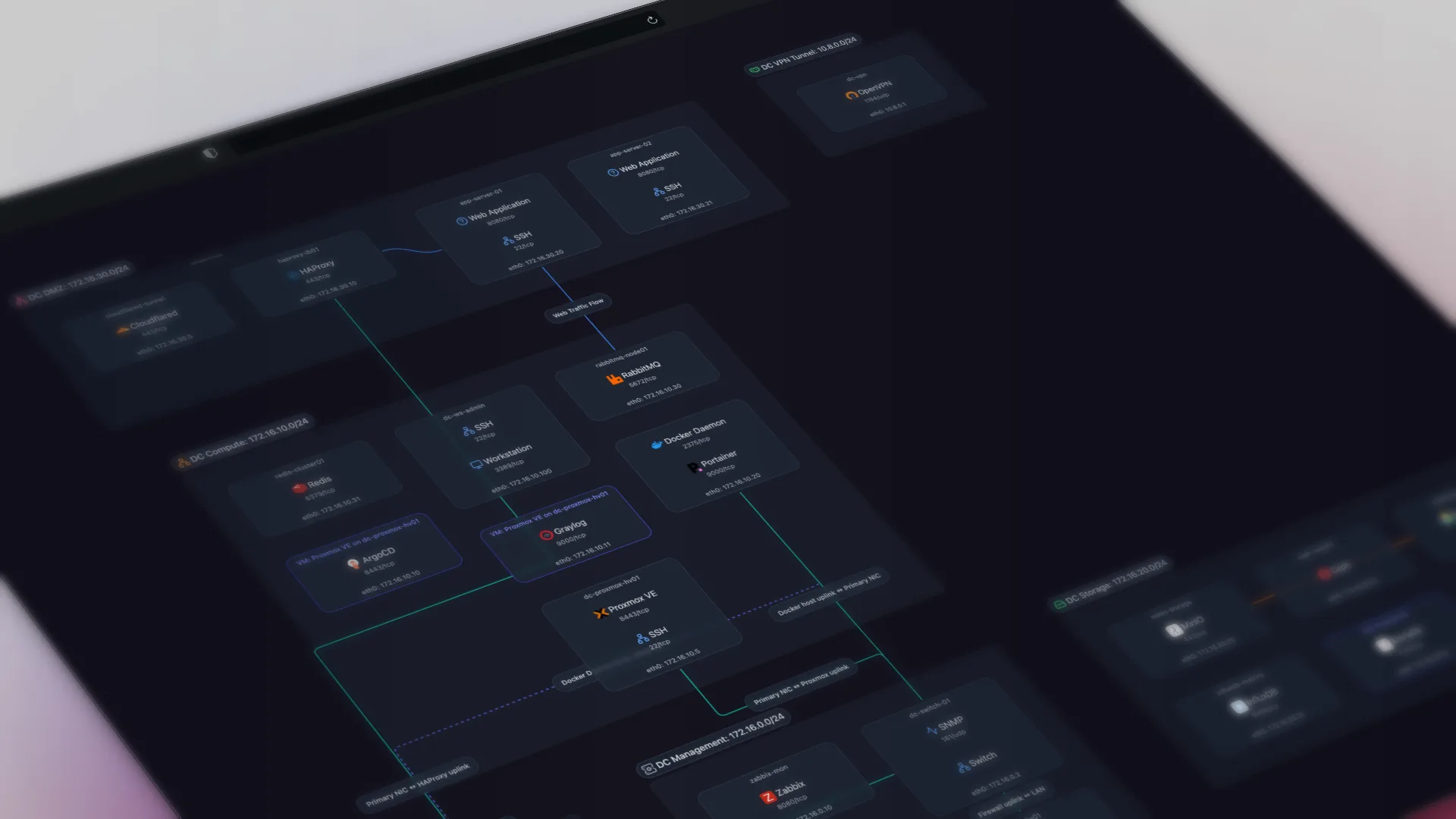
TL;DR: CMMC Level 2 requires a network diagram, though not among its 110 security requirements. The scoping rule (32 CFR 170.19) requires every in-scope asset, OT included, to appear in an asset inventory and a network diagram of the assessment scope. Automated discovery builds both from the network and keeps them current.
A CMMC Level 2 assessment starts with scoping, and scoping starts with two documents: an asset inventory and a network diagram of everything in the assessment scope. Both are easy to produce once for the first assessment and hard to keep true afterwards. A diagram drawn for last year's assessment describes last year's network.
Does CMMC Level 2 require a network diagram?
Yes, but the requirement sits in the scoping rule, not in the 110 security requirements.
The CMMC program rule, 32 CFR 170.19(c)(1), sorts every asset into categories. Four categories fall inside the Level 2 assessment scope: CUI Assets, Security Protection Assets, Contractor Risk Managed Assets, and Specialized Assets. For each one, the contractor's requirements include "Document in the asset inventory" and "Document in the network diagram of the CMMC Assessment Scope." The rule applies before "a Level 2 self-assessment or Level 2 certification assessment," so it covers contractors who self-assess as well as those facing a C3PAO.
The security requirements themselves come from NIST SP 800-171 Rev 2 and never say "network diagram." They come close. Requirement 3.4.1 calls for baseline configurations and inventories. Its discussion says a baseline covers "network topology, and the logical placement of those components within the system architecture," and that inventories record "machine names and network addresses" for networked devices. Requirement 3.12.4 asks for a system security plan that describes system boundaries and connections to other systems. A current diagram and inventory supply that evidence.
What CMMC Level 2 requires, and what Scanopy produces for it
Scoping and five of the Level 2 requirements depend on the same current picture of the network. Each maps to something Scanopy produces:
| CMMC requirement | Evidence it needs | What Scanopy produces |
|---|---|---|
| Scoping (32 CFR 170.19(c)(1)) | Every in-scope asset in the asset inventory and in a network diagram of the assessment scope | The host and service inventory with CSV export, plus Physical (L2) and Logical (L3) topology |
| CM.L2-3.4.1 inventory | An inventory of hardware, software, and firmware, with machine names and network addresses, maintained over time | Hostnames, IP and MAC addresses, vendor, model, serial number, and firmware revision, refreshed on a schedule |
| CM.L2-3.4.1 baseline | A baseline that includes network topology and the logical placement of components, reviewed and updated | Physical (L2) and Logical (L3) topology, and snapshots as a dated baseline you compare over time |
| CA.L2-3.12.4 system security plan | The system boundary and connections to other systems, described in the SSP | The Logical (L3) view of subnets and the hosts on each, and the Physical (L2) view of links between devices |
| CM.L2-3.4.7 nonessential services | A security-based decision about which ports, protocols, and services to restrict | The per-host service inventory (200+ service types, with ports), the list you review against |
| SC.L2-3.13.5 subnetworks for public components | Publicly accessible components on subnetworks separated from internal networks | The Logical (L3) view, showing which subnet each host sits on |
None of these can be met with a diagram drawn once. The NIST assessment objectives for 3.4.1 (SP 800-171A) require the baseline and the inventory to be "maintained (reviewed and updated) throughout the system development life cycle."
Scanopy discovers this from the network itself. Its daemon finds hosts, services, interfaces, and network devices, identifies vendors, models, serial numbers, and firmware revisions over SNMP, and maps the topology through LLDP, CDP, ARP, and switch MAC forwarding tables. It presents the result as four views plus an exportable inventory.
The scoping rule puts OT, IIoT, and IoT devices in their own category, Specialized Assets. They are exempt from the other Level 2 requirements, but they must still appear in the inventory, the SSP, and the network diagram. Scanopy identifies industrial devices over EtherNet/IP, Modbus TCP, OPC UA, and BACnet, and records the vendor, product, serial number, and firmware revision where the device reports them. A PROFINET DCP sweep finds PROFINET devices that have no IP address at all and places them on the physical map, which an IP-based scan cannot do.
The two that carry most of the compliance weight:
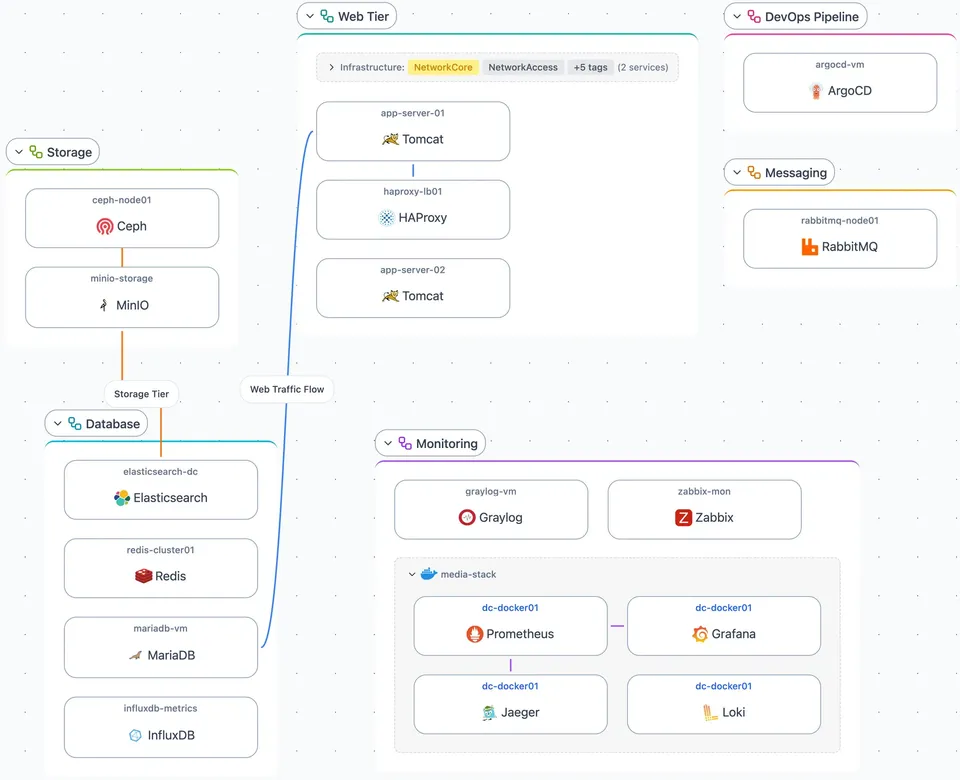
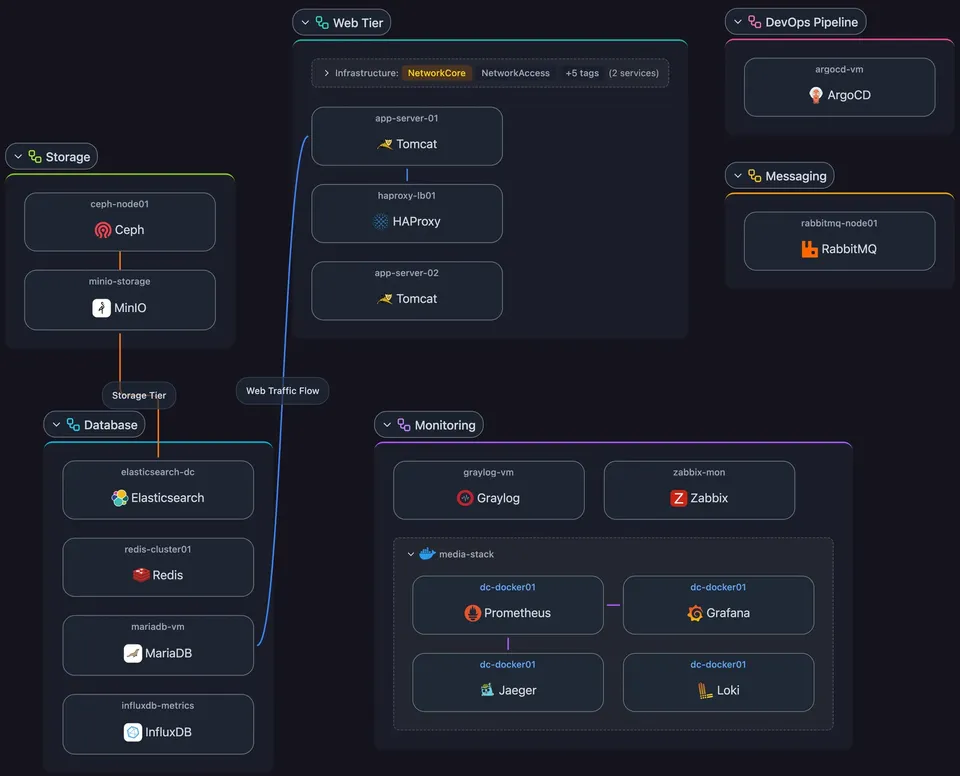
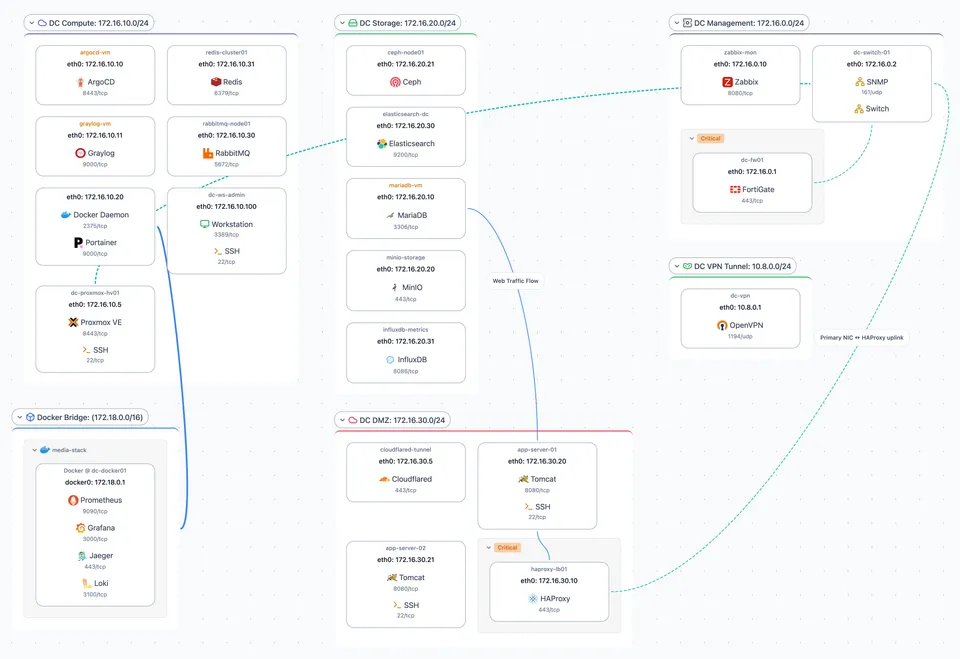
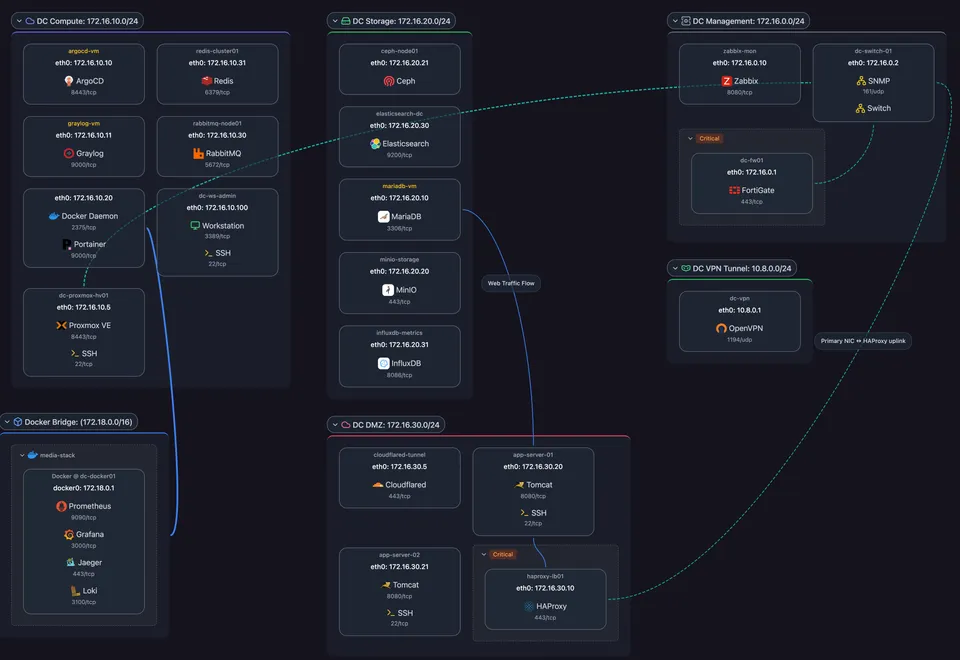
Explore all four on the live map:
Scanopy documents what is on the network and how it connects. Which assets belong in which category, which systems handle CUI, and where the assessment boundary sits are scoping decisions you make, and the map is the evidence you make them against.
Assessors ask for the scope, inventory, diagram, and SSP before the assessment starts
Whether the assessment is a self-assessment or a C3PAO certification, the scoping documents come first:
- The CMMC Assessment Scope, specified before the assessment begins.
- An asset inventory that covers every in-scope category, Specialized Assets included.
- A network diagram of the assessment scope.
- The system security plan, describing boundaries, the environment of operation, and connections to other systems.
- For a self-assessment, the SPRS entry, which records the assessment scope alongside the score (32 CFR 170.16).
DoD suspended Phase 2, the planned move to required third-party assessments, on July 13, 2026, pending a task force review (Federal News Network). Level 2 self-assessments against NIST SP 800-171 Rev 2 and SPRS scoring still apply, and so does the scoping rule.
An inventory that was accurate at the last assessment and has drifted since fails the 3.4.1 maintenance objective. Automated discovery rebuilds the inventory and map from the live network on a schedule, so the version you hand over is current by default, and snapshots record the network at each point in between.
How to turn discovery into CMMC evidence
The inventory and diagram have to leave the tool to reach an SSP or an assessor.
Scanopy gets the current map out three ways:
- Export the map. A static copy: an image (PNG, SVG, PDF), a self-contained HTML page, an editable diagram (draw.io, Visio), wiki markup (Mermaid, Confluence), or CSV of the underlying host and service data. Drop the current diagram straight into a compliance document or evidence pack.
- Embed the live map. An iframe that puts the live map inside a wiki, dashboard, or intranet page. The page an auditor opens shows the current topology, not a stale attachment.
- Share a read-only link. A link to the live map, read-only, that stays current as the network rescans. Give an auditor a view without exporting or emailing anything.
Those show the network as it is now. Auditors and authorities also ask whether it is kept current over time. Save a dated snapshot: A saved, dated capture of the network state, taken at each audit or review. Show what the network looked like on a date and what changed since: the record that the documentation is maintained, not reconstructed for the assessment.
What Scanopy does not do for CMMC
Scanopy covers one part of the work. It does not do the rest:
- No tool makes you CMMC compliant or certified. CMMC status comes from a self-assessment or a C3PAO or DIBCAC assessment of your environment. Scanopy produces two artifacts that assessment needs.
- It does not score your self-assessment, enter it in SPRS, or write your SSP or plan of action and milestones.
- It does not decide asset categories or classify CUI. It maps systems and their connections, not data content.
- It does not enforce segmentation or configuration settings. It documents them; enforcement is your firewalls and switches.
- It does not do vulnerability scanning, monitoring, or alerting. It runs alongside those tools, not instead of them.
On self-hosting: the Community and commercial self-hosted editions run entirely on your infrastructure, so Scanopy is your own asset rather than an External Service Provider and no third party holds the discovery data. That data describes the configuration of in-scope assets, which fits the rule's definition of Security Protection Data. Plan to list the Scanopy server in your inventory, diagram, and SSP as a Security Protection Asset, assessed against the Level 2 requirements relevant to what it does.
Scanopy keeps the scoping diagram and inventory current. It does not run your assessment.
Scanopy is network documentation software: a lightweight daemon discovers your hosts, services, interfaces, topology, and application dependencies, then builds an interactive map with four views (physical, logical, workloads, applications) that updates on a schedule and exports for evidence. For a defense contractor, its job is to keep the asset inventory and the network diagram of the assessment scope accurate on their own, OT included, so each assessment starts from the network as it is. It runs alongside your security tooling and your assessment work, not in place of them.
The Community Edition is free and self-hosted. The commercial editions raise the seat and site limits (25 seats and 50 sites on Standard, 50 and 100 on Plus) and add support. Contractors that also certify to ISO 27001 or handle health data will find the same map doing double duty: see the guides to network documentation for ISO 27001 and network documentation for HIPAA. For how Scanopy fits compliance work across standards, see the compliance overview, and for the broader category, the network documentation software guide.
Frequently Asked Questions
Does CMMC Level 2 require a network diagram?
Yes, through the scoping rule rather than the 110 security requirements. 32 CFR 170.19(c)(1) requires every in-scope asset category (CUI Assets, Security Protection Assets, Contractor Risk Managed Assets, and Specialized Assets) to be documented in the asset inventory and in the network diagram of the CMMC Assessment Scope. The rule applies before a Level 2 self-assessment as well as a C3PAO certification assessment.
What goes in a CMMC asset inventory?
NIST SP 800-171 requirement 3.4.1 asks for an inventory of hardware, software, and firmware, maintained throughout the system life cycle. Its discussion lists the details that make an inventory usable, including manufacturer, device type, model, serial number, physical location, component owner, and, for networked devices, machine names and network addresses. The scoping rule adds that every in-scope asset category belongs in it, OT and IoT devices included.
Are OT and IoT devices in scope for CMMC Level 2?
Yes, as Specialized Assets. The scoping rule names IoT, Industrial IoT, operational technology, government furnished equipment, restricted information systems, and test equipment. They are not assessed against the other Level 2 requirements, but they must appear in the asset inventory, the system security plan, and the network diagram of the assessment scope, with a description of how your risk-based policies manage them.
Is a network diagram the same as a CUI data flow diagram?
No. A network diagram shows infrastructure, meaning the devices, subnets, and connections in the assessment scope. A data flow diagram shows where CUI moves between people, systems, and external parties. The scoping rule requires the network diagram. Scanopy produces the network diagram and a map of which services depend on which others. Deciding which of those paths carry CUI is part of your scoping work.
Does network documentation software make me CMMC compliant?
No. CMMC status comes from a self-assessment entered in SPRS, a C3PAO certification assessment, or a DIBCAC assessment of your environment against the Level 2 requirements. No software confers it. Network documentation software produces two artifacts the assessment needs, the asset inventory and the network diagram of the assessment scope, and keeps them current. It does not score the assessment, write your SSP, or classify CUI.
Can I self-host network documentation inside my CUI boundary?
Yes, and it keeps the scoping question simple. A self-hosted install runs on your own hardware, so it is your asset rather than an External Service Provider. The data it holds about in-scope assets fits the rule's definition of Security Protection Data, so list the server in your inventory, diagram, and SSP as a Security Protection Asset, assessed against the Level 2 requirements relevant to what it does.
Did the Phase 2 suspension change what I have to document?
No. On July 13, 2026, DoD suspended Phase 2, which would have required Level 2 third-party assessments from November 10, 2026, pending a task force review. Level 2 self-assessments, NIST SP 800-171 Rev 2 under DFARS 252.204-7012, and SPRS scores remain in force. The scoping rule that requires the asset inventory and network diagram applies to self-assessments as well.
Which NIST SP 800-171 revision does CMMC Level 2 use?
Revision 2. The CMMC rule states that the Level 2 security requirements are identical to the 110 requirements in NIST SP 800-171 Rev 2 (32 CFR 170.14), even though NIST published Revision 3 in May 2024. Level 2 assessments, self-assessments included, use the Rev 2 requirements and the matching assessment objectives in NIST SP 800-171A.
Started as a homelabber, now deep in SNMP MIBs, Layer 3 topology, and service fingerprinting - building the network documentation tool I wished existed.