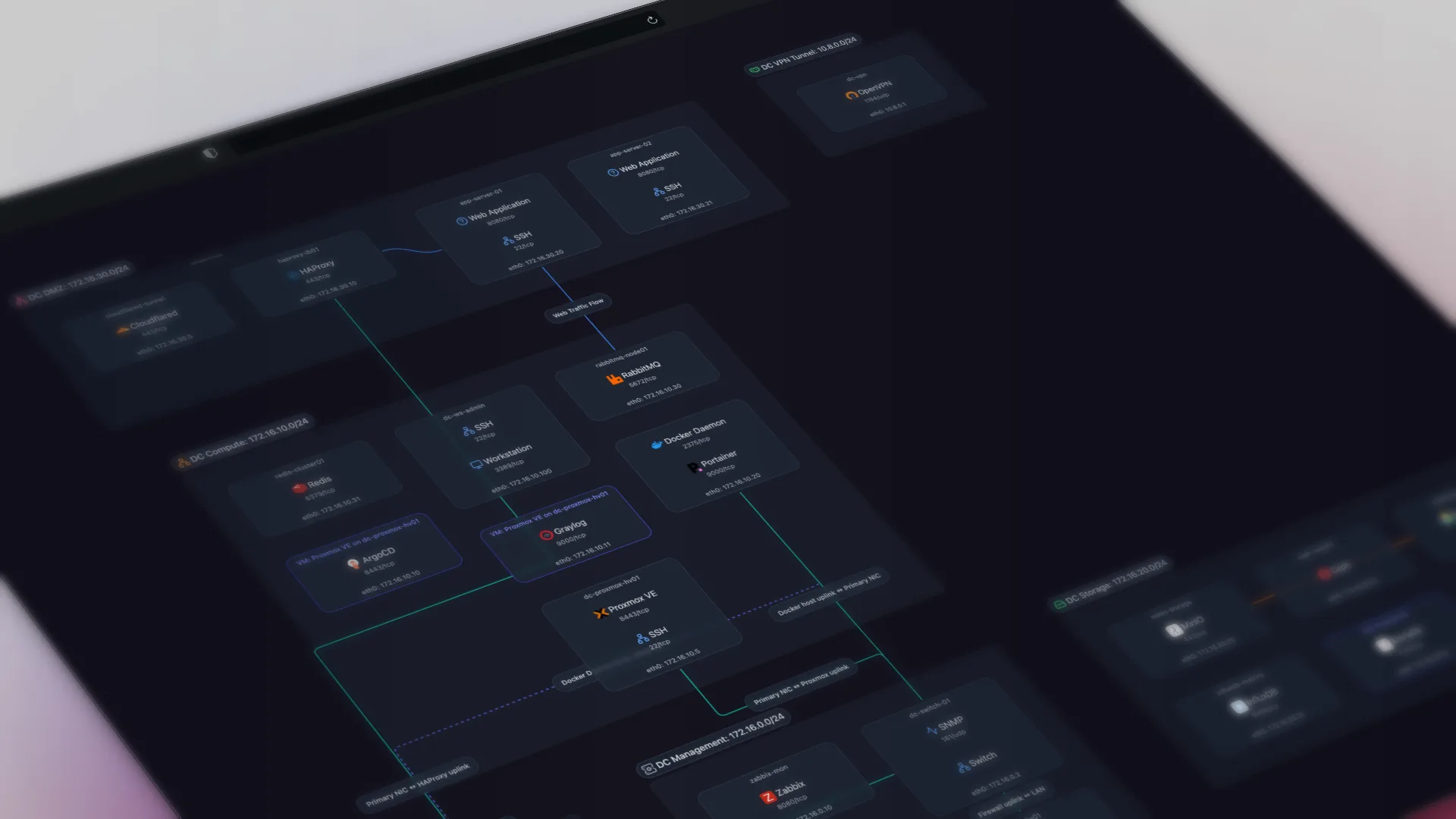
TL;DR: HIPAA's Security Rule never names a network diagram. But the required risk analysis (45 CFR 164.308(a)(1)(ii)(A)) and NIST's implementation guidance both assume you can map the systems, data flows, and assets that touch ePHI. Automated network documentation produces that current-state map, kept up to date on its own.
HIPAA is a common reason healthcare IT teams go looking for network documentation, and a commonly misunderstood one. The Security Rule never says "keep a network diagram." So teams either assume they're off the hook, or they draw a diagram once for an audit and let it go stale. Both are the wrong read.
Does HIPAA require a network diagram?
No. If you're looking for a citation that says "you must have a diagram," it isn't there.
What is there is the requirement that anchors everything else: the risk analysis. 45 CFR 164.308(a)(1)(ii)(A) requires every covered entity and business associate to "conduct an accurate and thorough assessment of the potential risks and vulnerabilities to the confidentiality, integrity, and availability" of electronic protected health information. You cannot assess risk to ePHI accurately without knowing what systems exist, where ePHI lives, and how those systems connect. The diagram isn't the requirement. It's how you meet one.
What HIPAA requires, and what Scanopy produces for it
The authoritative guidance on implementing the Security Rule is NIST SP 800-66 Rev 2 (February 2024). It tells organizations to "map systems, data flows, and assets that store or process ePHI" as part of assessing their current state. That single sentence names the three things network documentation gives you: systems, data flows, and assets.
Several Security Rule standards lean on that same current-state picture, and each maps to something Scanopy produces:
| HIPAA requirement | Evidence it needs | What Scanopy produces |
|---|---|---|
| Risk analysis (164.308(a)(1)(ii)(A)) | An accurate map of systems, assets, and how ePHI flows between them | The topology plus the Applications view (service-to-service data flows) |
| Evaluation (164.308(a)(8)) | Periodic review against a current baseline as the environment changes | Snapshots: a dated baseline you compare over time |
| Contingency plan (164.308(a)(7)) | Knowing your infrastructure well enough to restore it | Physical (L2) and Logical (L3) topology |
| Access control (164.312(a)(1)) | Evidence that systems handling ePHI are appropriately separated | The Logical (L3) view: subnets and segmentation |
| Transmission security (164.312(e)(1)) | Understanding the paths ePHI travels across the network | The Applications view: service-to-service dependencies |
None of these say "diagram." All of them assume you have a current, accurate model of your network. Automated documentation supplies that current-state model.
Data flows are the piece an inventory alone doesn't give you. Knowing you own 400 devices doesn't tell you where ePHI can travel; knowing which systems talk to which does.
Scanopy discovers all of this from the network directly. Its daemon finds hosts, services, interfaces, and network devices and maps the topology, then presents it as four views plus an exportable inventory. The physical and logical views are the systems-and-assets half; the Applications view maps service-to-service dependencies, the closest thing to a data-flow map you can build without manual diagramming, showing which services depend on which others and therefore the routes data can move between them.
The two that carry most of the compliance weight:
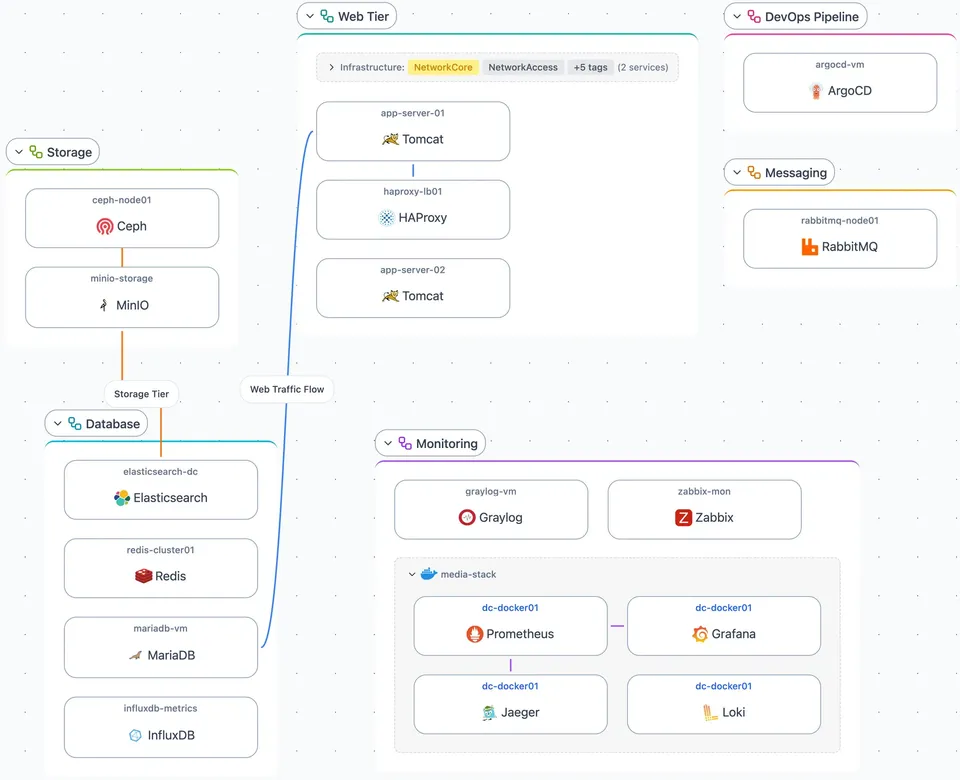
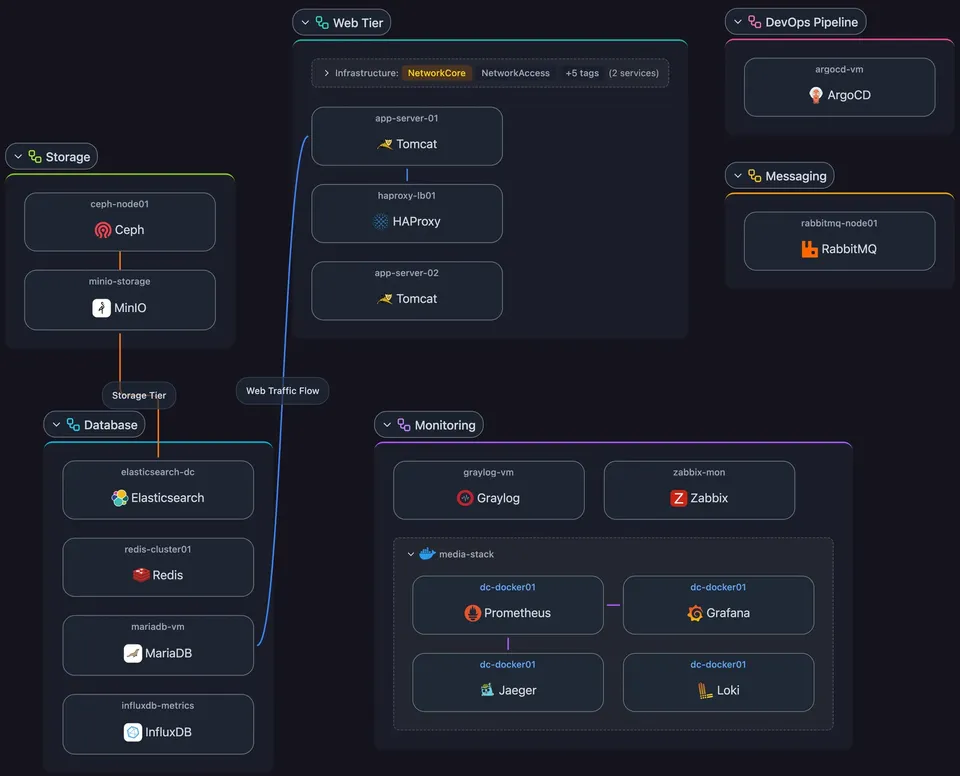
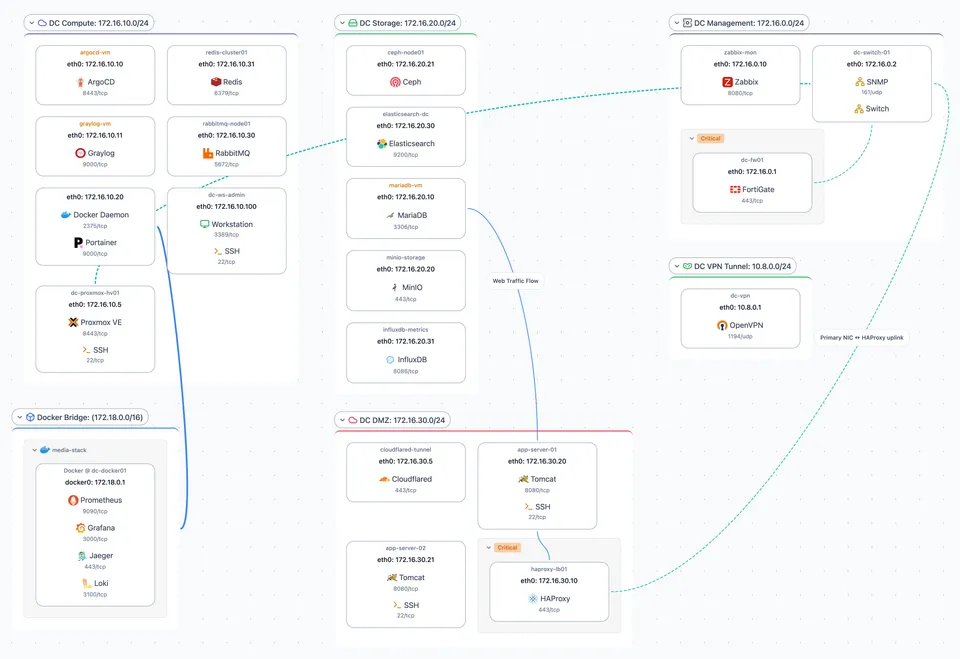
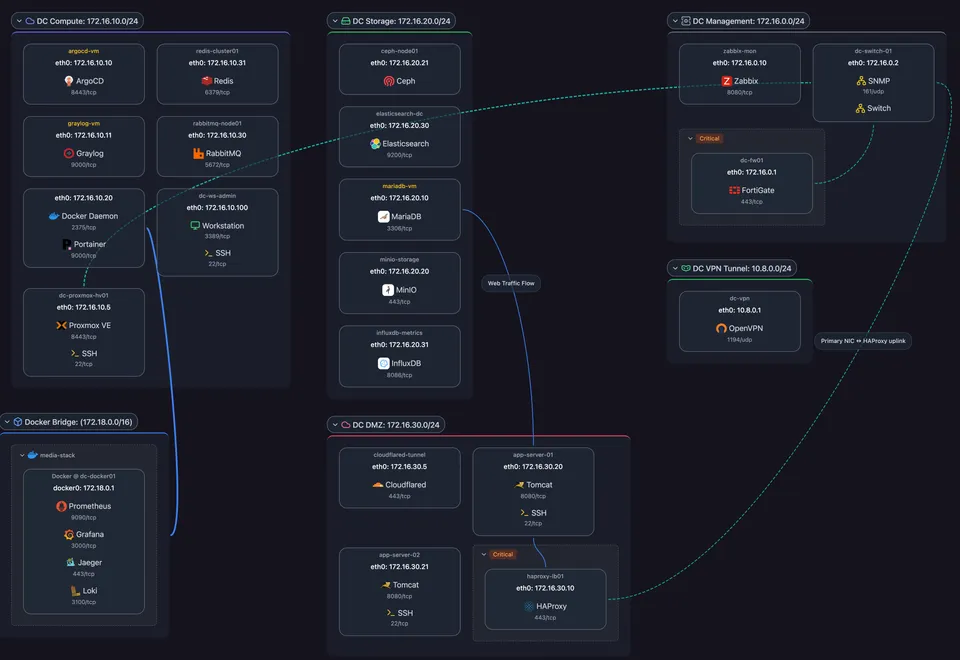
Explore all four on the live map:
Scanopy maps the connections and dependencies between systems, discovered from the network. It does not read, classify, or track the ePHI itself. It shows the paths ePHI can travel, based on how your systems are wired and which services depend on each other. It is not deep packet inspection and not a data-classification tool. Scanopy gives your risk analysis an accurate map of the structure; deciding where ePHI actually lives is part of the analysis.
Assessors ask for a current inventory, a topology, and segmentation evidence
Whether it's an internal risk analysis, an external assessment, or a cyber-insurance questionnaire, the requests are much the same:
- A current inventory of systems and devices, not a list from the last audit.
- A network topology showing how those systems connect.
- Evidence of segmentation between ePHI systems and the rest of the network.
- Confirmation that the documentation reflects the network as it is now.
OCR investigations and assessors repeatedly flag inventories and diagrams that were accurate once and drifted. A Visio file from two years ago is worse than useless in an audit, because it asserts a state that no longer exists. Automated discovery answers this by rebuilding the map from the live network on a schedule, so "current" is the default rather than a scramble before an assessment.
How to turn discovery into audit evidence
Documentation only helps if you can hand it to someone.
Scanopy gets the current map out three ways:
- Export the map. A static copy: an image (PNG, SVG, PDF), a self-contained HTML page, an editable diagram (draw.io, Visio), wiki markup (Mermaid, Confluence), or CSV of the underlying host and service data. Drop the current diagram straight into a compliance document or evidence pack.
- Embed the live map. An iframe that puts the live map inside a wiki, dashboard, or intranet page. The page an auditor opens shows the current topology, not a stale attachment.
- Share a read-only link. A link to the live map, read-only, that stays current as the network rescans. Give an auditor a view without exporting or emailing anything.
Those show the network as it is now. Auditors and authorities also ask whether it is kept current over time. Save a dated snapshot: A saved, dated capture of the network state, taken at each audit or review. Show what the network looked like on a date and what changed since: the record that the documentation is maintained, not reconstructed for the assessment.
What Scanopy does not do for HIPAA
Scanopy covers one slice of the work. It does not do the rest:
- Scanopy is not "HIPAA compliant" software, because that category does not exist. No tool certifies an organization. Scanopy produces one evidence artifact several requirements assume you maintain.
- It does not perform your risk analysis. It supplies the current-state map the analysis reasons about; a person still has to assess the risks.
- It does not classify or track ePHI. It maps systems and their connections, not data content.
- It does not enforce access control or segmentation. It documents whether they exist; enforcement is your firewalls and switches.
- It does not do monitoring, alerting, or patch management. It runs alongside those tools, not instead of them.
On self-hosting: the Community and commercial self-hosted editions run entirely on your infrastructure, so the discovery data (a description of your internal network) never leaves your environment and no third party holds it. Because nothing is shared with Scanopy, a business associate agreement with Scanopy is not implicated for the self-hosted editions.
Scanopy keeps the risk-analysis map current. It does not do the analysis.
Scanopy is network documentation software: a lightweight daemon discovers your hosts, services, interfaces, topology, and application dependencies, then builds an interactive map with four views (physical, logical, workloads, applications) that updates on a schedule and exports for audit use. For a HIPAA covered entity, its job is to keep the systems-and-data-flow map your risk analysis depends on accurate without anyone maintaining it by hand. It runs alongside your monitoring, access control, and risk-management work, not in place of them.
The Community Edition is free and self-hosted. The commercial editions raise the seat and site limits (25 seats and 50 sites on Standard, 50 and 100 on Plus) and add support. Covered entities that also certify to a security standard or operate in the EU will find the same map doing double duty: the guides to network documentation for ISO 27001 and network documentation for NIS2 cover those controls, and defense contractors can see the CMMC Level 2 guide. For how Scanopy fits compliance work across standards, see the compliance overview, and for the deeper category overview, the network documentation software guide.
Frequently Asked Questions
Does HIPAA require a network diagram?
Not explicitly. The HIPAA Security Rule never uses the words "network diagram," unlike PCI-DSS, which names it directly. What HIPAA requires is a risk analysis (45 CFR 164.308(a)(1)(ii)(A)), and NIST's implementation guidance (SP 800-66 Rev 2) says that analysis should map the systems, data flows, and assets that store or process ePHI. A current network map is one way to satisfy that expectation.
What is a HIPAA data flow diagram?
A data flow diagram shows how electronic protected health information moves between the systems that create, receive, store, or transmit it. HIPAA doesn't mandate one by name, but NIST SP 800-66 Rev 2 directs organizations to map data flows as part of the risk analysis. In practice it means documenting which systems connect to which, so you can see the paths ePHI can travel across your network.
Does network documentation software make me HIPAA compliant?
No. There is no such thing as HIPAA-certified software, and no single tool makes an organization compliant. Network documentation software produces one piece of evidence the Security Rule assumes you maintain: an accurate, current map of your systems and their connections. It supports the risk analysis and audit process. It does not perform the risk analysis, classify ePHI, or enforce access controls.
How does automated discovery help with a HIPAA risk analysis?
A risk analysis has to start from an accurate picture of what exists and how it connects, and OCR audits repeatedly cite incomplete or outdated inventories as a top failing. Automated discovery builds that picture from the network itself (hosts, services, topology, and application dependencies) and refreshes it on a schedule, so the inventory and data-flow map your risk analysis depends on stay current instead of aging into fiction.
How often should HIPAA network documentation be updated?
HIPAA requires periodic review and updates as the environment changes (45 CFR 164.308(a)(8)), without setting a fixed interval. The practical answer is that documentation should reflect the network as it is now, not as it was at the last audit. Automated discovery rescans on a schedule (daily or weekly for most teams), so the map stays current without someone remembering to redraw it.
Can I self-host network documentation for HIPAA?
Yes, and for a covered entity it's often the cleaner path. Self-hosting means the discovery data (which describes your internal network) never leaves your environment, so there's no third party holding it, and a business associate agreement with Scanopy is not implicated for the self-hosted editions. Scanopy's Community Edition is free and self-hosted; the commercial self-hosted edition removes the seat and network limits. Both run entirely on your own infrastructure.
Does topology documentation prove network segmentation for HIPAA?
It provides the evidence. Segmenting systems that handle ePHI from the rest of the network is a common safeguard under the access control and transmission security standards (45 CFR 164.312). A current logical topology shows which subnets exist and how hosts sit across them, which is what an assessor looks at to confirm segmentation is real rather than assumed. It documents the state; it doesn't enforce it.
Started as a homelabber, now deep in SNMP MIBs, Layer 3 topology, and service fingerprinting - building the network documentation tool I wished existed.